Skip to content

Changelog

New updates and improvements at Cloudflare.

Agents can respond to MCP elicitation requests

Agents connected to Model Context Protocol (MCP) servers with addMcpServer can now handle elicitation requests.

Elicitation lets an MCP server request user input while it handles a tool call. Form mode collects structured, non-sensitive data. URL mode asks for consent before opening an out-of-band flow, such as third-party authorization or payment.

sequenceDiagram
    participant User
    participant Agent as Agent (MCP client)
    participant Server as MCP server
    participant Browser

    Server->>Agent: elicitation/create
    Agent->>User: Show server, reason, and input or URL
    User->>Agent: Submit, open, decline, or cancel
    Agent->>Browser: Open URL after consent (URL mode)
    Agent->>Server: accept, decline, or cancel
    Server-->>Agent: Optional URL completion notification

Register a handler for each mode your Agent supports in onStart():

import { Agent } from "agents";

export class MyAgent extends Agent {
	onStart() {
		this.mcp.configureElicitationHandlers({
			form: (request, serverId) => this.forwardToUser(request, serverId),
			url: (request, serverId) => this.forwardToUser(request, serverId),
		});
	}

	forwardToUser(request, serverId) {
		// Show the request in your UI and resolve after the user responds.
		throw new Error(
			`Implement elicitation for ${serverId}: ${request.params.message}`,
		);
	}
}
import { Agent } from "agents";
import type { ElicitRequest, ElicitResult } from "agents/mcp";

export class MyAgent extends Agent<Env> {
	onStart() {
		this.mcp.configureElicitationHandlers({
			form: (request, serverId) => this.forwardToUser(request, serverId),
			url: (request, serverId) => this.forwardToUser(request, serverId),
		});
	}

	private forwardToUser(
		request: ElicitRequest,
		serverId: string,
	): Promise<ElicitResult> {
		// Show the request in your UI and resolve after the user responds.
		throw new Error(
			`Implement elicitation for ${serverId}: ${request.params.message}`,
		);
	}
}

Connections advertise only the modes with configured handlers. An Agent without handlers advertises no elicitation capability, which lets the server use its fallback. The SDK stores the advertised modes with each MCP server registration so they survive Durable Object hibernation. Callback functions remain in memory and reattach when onStart() runs.

For implementation details and a browser forwarding pattern, refer to MCP client elicitation. The mcp-client and mcp-elicitation examples implement both sides.

Upgrade

To update to this release:

npm i agents@latest

Precursor introduces session-based bot detection

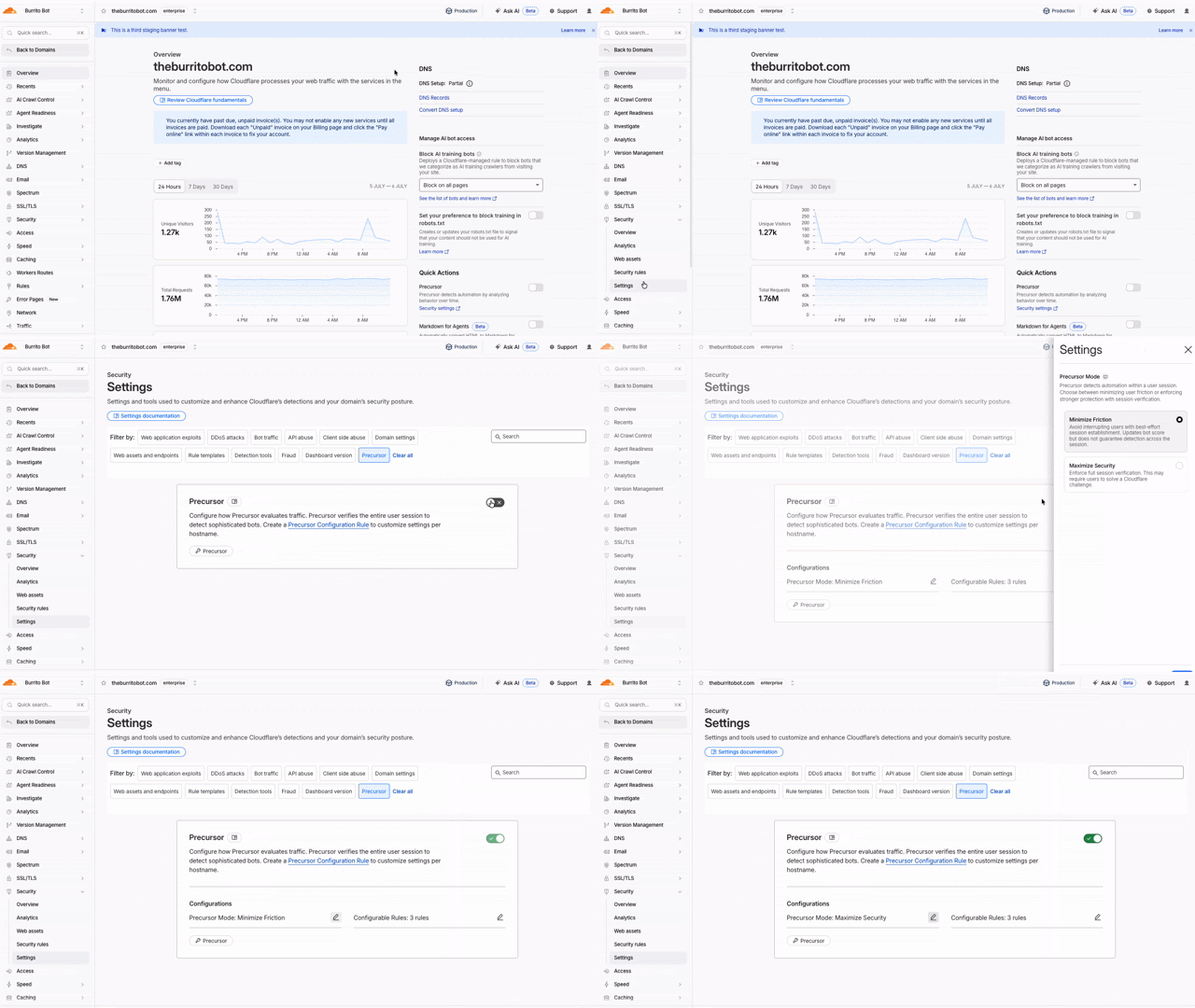
Precursor is rolling out to all customers starting today. Precursor is client-side JavaScript that enables session-based bot detection.

You can read the announcement blog for background on why we built Precursor and how session-level behavioral detection works.

With Precursor enabled, Cloudflare can:

  • Continuously evaluate behavioral signals across a session
  • Re-validate challenge clearance as behavior changes
  • Update bot scores with session context
  • Provide client-side visibility where none previously existed

It integrates with existing protections, including Security Rules, and can be enabled directly from the Cloudflare dashboard with configurable modes to balance security and user experience.

Animated walkthrough of enabling Precursor in the Cloudflare dashboard

To learn more, refer to the Precursor documentation.

Origin Content Signals for Markdown for Agents

Markdown for Agents now preserves security- and cache-relevant response headers from your origin when converting HTML to Markdown:

  • Markdown for Agents preserves security headers such as Strict-Transport-Security (HSTS), Content-Security-Policy (CSP), X-Frame-Options, Set-Cookie, and CORS headers (for example, Access-Control-Allow-Origin) on the converted response.
  • Caching headers (Cache-Control, Expires, Age) continue to pass through.

Your origin's Content Signals policy is now authoritative. If your origin sets a content-signal header, Markdown for Agents preserves it. When the origin does not send one, Cloudflare adds the default Content-Signal: ai-train=yes, search=yes, ai-input=yes.

This release also fixes relative link resolution for directory-style base URLs (those ending in a trailing slash). Previously, relative links such as ../page/ could resolve one path segment too high and return a 404. Links are now resolved correctly per RFC 3986.

Refer to our developer documentation for more details.

R2 Data Catalog now supports read-only API tokens

R2 Data Catalog now accepts read-only API tokens, so query engines and clients that only read data no longer need a read-write token. Previously, every catalog operation required an Admin Read & Write token, which granted read-only clients more access than they needed.

You can now authenticate your Iceberg engine based on your workload:

  • Read-only operations (such as listing namespaces, loading tables, and querying data) work with an Admin Read only token (R2 Data Catalog read and R2 storage read).
  • Write operations (such as creating or dropping tables and committing transactions) continue to require an Admin Read & Write token.

This lets you follow the principle of least privilege — for example, using a read-write token for the pipeline that writes to your tables and read-only tokens for engines like R2 SQL, DuckDB, or PyIceberg that query them.

Note that credentials vended by the catalog inherit the R2 storage permissions of the token used to authenticate. To ensure read-only access to your underlying data, scope the R2 storage permission to read-only as well.

For details on choosing and creating the right token, refer to Authenticate your Iceberg engine.

R2 Data Catalog compaction now optimizes manifest files

R2 Data Catalog, a managed Apache Iceberg catalog built into R2, now automatically optimizes manifest files as part of compaction.

Manifest files track the data files that make up an Iceberg table. As a table accumulates many small or fragmented manifests, query engines must read more metadata during query planning, which slows down queries even before any data is scanned.

When compaction runs, R2 Data Catalog now rewrites and clusters manifest files by partition as a best-effort pre-step. This consolidates fragmented manifests, reduces the number of manifests a query engine must open, and lowers metadata I/O overhead. Tables that are already well-clustered are skipped, so the operation only runs when it provides a benefit.

This happens automatically for tables with compaction enabled — no configuration changes are required.

For more information, refer to Table maintenance.

Source code detection improvements

Data Loss Prevention (DLP) source code detection now focuses on identifying whole source code file uploads and downloads. Previously, source code detection performed partial scans resulting in a higher rate of false positives. Since only whole source code files are evaluated, code embedded in other content — such as chat messages, documentation, or code samples — is no longer flagged as source code, removing a common source of false positives.

Source code detection requires a minimum of 500 characters to evaluate a file. Files below this threshold are not flagged to reduce noise. This threshold filters out small fragments that lack enough context for reliable classification.

Enable and set confidence levels to tune match sensitivity. A higher confidence level reduces false positives by requiring stronger signals that the content is truly source code. A lower confidence level catches more files at the cost of additional noise.

Source code detection applies to standalone source code files in Gateway HTTP policies. It does not detect source code embedded within other file types or payloads, such as .docx files or chat messages.

For more information, refer to Source Code predefined profiles.

Plain text output for Markdown Conversion

The Markdown Conversion service now supports a new output conversion option that controls the format of the converted content.

Set output.format to text to receive plain text with Markdown syntax removed. The default value is markdown, so existing conversions are unchanged.

Use the env.AI binding:

await env.AI.toMarkdown(
	{ name: "page.html", blob: new Blob([html]) },
	{
		conversionOptions: {
			output: { format: "text" },
		},
	},
);
await env.AI.toMarkdown(
	{ name: "page.html", blob: new Blob([html]) },
	{
		conversionOptions: {
			output: { format: "text" },
		},
	},
);

Or call the REST API:

curl https://api.cloudflare.com/client/v4/accounts/{ACCOUNT_ID}/ai/tomarkdown \
  -H 'Authorization: Bearer {API_TOKEN}' \
  -F 'files=@index.html' \
  -F 'conversionOptions={"output": {"format": "text"}}'

When you request text output, the format field of each result is set to text. For more details, refer to Conversion Options.

Workflows now supports delay functions when retrying

With Workflows, you can configure built-in retry behavior for each step. Previously, you could configure step retries with fixed delay durations, such as seconds, minutes, or hours, and backoff strategies such as constant, linear, or exponential.

Step retries now support dynamic delay functions. Instead of choosing only a base delay and backoff strategy, pass a function to retries.delay and calculate the next delay from the failed attempt and thrown error.

This is useful when retries should depend on the failure. Your Workflow may need to wait longer after a rate-limit error, but retry sooner after a short network failure. The delay function can also accommodate provider guidance if, for example, a downstream API returns a Retry-After value in its error messaging.

await step.do(
	"sync customer",
	{
		retries: {
			limit: 5,
			delay: ({ ctx, error }) => {
				if (error.message.includes("rate limit")) {
					return `${ctx.attempt * 30} seconds`;
				}

				return "10 seconds";
			},
		},
	},
	async () => {
		await syncCustomer();
	},
);
await step.do(
	"sync customer",
	{
		retries: {
			limit: 5,
			delay: ({ ctx, error }) => {
				if (error.message.includes("rate limit")) {
					return `${ctx.attempt * 30} seconds`;
				}

				return "10 seconds";
			},
		},
	},
	async () => {
		await syncCustomer();
	},
);

Dynamic delay functions can return a duration string, a number, or a promise that resolves to a duration. Use them to add adaptive retry behavior without writing separate queue or scheduling logic. For more information, refer to Sleeping and retrying.

Wi-Fi signal and network performance analytics for Cloudflare One Client devices

Digital Experience Monitoring (DEX) provides visibility into device, network, and application performance across your Cloudflare SASE deployment.

The Device Monitoring page now analyzes hardware and network data between a Cloudflare One Client device and Cloudflare's edge, so you can diagnose connectivity and performance issues. Previously, this data was only available in raw DEX Device State Event logs, which required you to build your own analytics to interpret it.

Device Monitoring summary with connection status, connection mode, Wi-Fi signal strength, traffic performance, and device health

A summary at the top of the page shows the health of each category at a glance, using Good, Fair, and Poor labels:

  • Connection — connection status, Cloudflare One Client mode, and tunnel type over time
  • Wi-Fi signal strength — signal measured in dBm over time, with thresholds that flag a weak signal
  • Traffic performance — upstream and downstream performance, including network throughput on the active interface
  • Device health — hardware metrics such as CPU, memory, and disk
Wi-Fi signal strength and network throughput charts on the Device Monitoring page

You can filter by category and adjust the time range to correlate a device's metrics with a user's reported issue.

These analytics are available to all Cloudflare One customers at no additional cost.

To learn more, refer to the DEX monitoring documentation.

New DNS Firewall UX with more dashboard settings

The DNS Firewall page in the Cloudflare dashboard has been refreshed, bringing several settings that were previously API-only into the UI and modernizing how you view and manage your DNS Firewall clusters.

New DNS Firewall UX

What is new

  • More settings in the dashboard: cluster options that were previously only configurable through the API — such as attack mitigation, rate limiting, negative TTL, and resolver subnet — are now available directly in the dashboard.
  • Better table experience: the DNS Firewall cluster table has been revised to surface cluster details at a glance, with resizable columns and the option to show or hide columns to tailor the view to your workflow.
  • New create and edit UX: adding and editing clusters now uses a modernized form that groups related settings together, making configuration faster and clearer.

Availability

Available to all DNS Firewall customers as part of their existing subscription.

Where to find it

In the Cloudflare dashboard, go to the DNS Firewall page.

Go to Clusters ↗

For more information, refer to DNS Firewall.

New Durable Object namespaces must use the SQLite storage backend

If your account does not already have a key-value (KV) backed Durable Object namespace, you can no longer create new ones. New Durable Object namespaces must use the SQLite storage backend, which has been recommended for all new Durable Objects since it became generally available in 2024.

Create a new class with a new_sqlite_classes migration:

{
  "$schema": "./node_modules/wrangler/config-schema.json",
  "migrations": [
    {
      "tag": "v1",
      "new_sqlite_classes": [
        "MyDurableObject"
      ]
    }
  ]
}
[[migrations]]
tag = "v1"
new_sqlite_classes = ["MyDurableObject"]

SQLite-backed Durable Objects have feature parity with the key-value backend — including the key-value storage API — and additionally support relational SQL queries and point-in-time recovery to restore an object's storage to any point in the past 30 days.

If you attempt to create a new key-value backed namespace (a new_classes migration) on an affected account, the deployment fails with the following error:

Creating new key-value backed Durable Object namespaces is no longer supported on this account. Please create a namespace using a `new_sqlite_classes` migration instead.

This change only affects accounts that are not already using the key-value storage backend. Accounts with at least one existing key-value backed namespace can still create new ones for now, and the Workers Free plan has only ever supported SQLite-backed Durable Objects. It is part of a broader move toward SQLite as the single storage backend for Durable Objects, ahead of a future migration path for existing key-value backed objects.

For more information, refer to Durable Objects migrations.

Zero Trust Networks route endpoints and Cloudflare Tunnel connections field retiring on October 5, 2026

On October 5, 2026, two changes take effect across the Zero Trust Networks API and Cloudflare Tunnel API: the CIDR-encoded route endpoints are removed, and tunnel list and get responses no longer include the connections field. If you manage private network routes or read tunnel connection details through the API, cloudflared, Terraform, or another integration, review the changes in the following sections and migrate before the removal date.

Route endpoints

The CIDR-encoded route endpoints are deprecated in favor of the standard, route_id-based endpoints that already exist today. Both sets of endpoints route a private network through Cloudflare Tunnel or Cloudflare Mesh (the API still refers to Mesh nodes as warp_connector) — only the request shape changes.

Deprecated endpoints (removed October 5, 2026):

Replacement endpoints:

What is changing

Deprecated (CIDR-encoded path) Replacement
Route identifier URL-encoded CIDR in the path (/network/{ip_network_encoded}) route_id in the path (network moves to the request body on create)
Create POST .../teamnet/routes/network/{ip_network_encoded} POST .../teamnet/routes with network and tunnel_id in the body
Update PATCH .../teamnet/routes/network/{ip_network_encoded} PATCH .../teamnet/routes/{route_id}
Delete DELETE .../teamnet/routes/network/{ip_network_encoded} DELETE .../teamnet/routes/{route_id}

Action required

  1. Capture each route's route_id by calling List tunnel routes, or read it from the response the first time you create a route with the replacement endpoint.
  2. Update any scripts, backend services, or CI/CD pipelines that call the CIDR-encoded endpoints directly.
  3. If you manage routes with the cloudflared tunnel route ip add | delete commands, upgrade cloudflared to the latest version.
  4. If you manage routes with Terraform, make sure you are on a current version of the cloudflare_zero_trust_tunnel_cloudflared_route resource and the Cloudflare Terraform provider.
# Before: create a route by URL-encoding the CIDR into the path
curl https://api.cloudflare.com/client/v4/accounts/$ACCOUNT_ID/teamnet/routes/network/172.16.0.0%2F16 \
     -H 'Content-Type: application/json' \
     -H "Authorization: Bearer $CLOUDFLARE_API_TOKEN" \
     -d '{"tunnel_id": "'$TUNNEL_ID'", "comment": "Example comment for this route."}'

# After: create a route with the network in the request body
curl https://api.cloudflare.com/client/v4/accounts/$ACCOUNT_ID/teamnet/routes \
     -H 'Content-Type: application/json' \
     -H "Authorization: Bearer $CLOUDFLARE_API_TOKEN" \
     -d '{"network": "172.16.0.0/16", "tunnel_id": "'$TUNNEL_ID'", "comment": "Example comment for this route."}'

# After: update or delete a route using its route_id
curl -X PATCH https://api.cloudflare.com/client/v4/accounts/$ACCOUNT_ID/teamnet/routes/$ROUTE_ID \
     -H 'Content-Type: application/json' \
     -H "Authorization: Bearer $CLOUDFLARE_API_TOKEN" \
     -d '{"comment": "Updated comment for this route."}'

curl -X DELETE https://api.cloudflare.com/client/v4/accounts/$ACCOUNT_ID/teamnet/routes/$ROUTE_ID \
     -H "Authorization: Bearer $CLOUDFLARE_API_TOKEN"

Cloudflare Tunnel and Cloudflare Mesh connections

Starting the same day, the connections array is removed from list and get responses for Cloudflare Tunnel and Cloudflare Mesh nodes (the cfd_tunnel and warp_connector API resources). Query the dedicated connections endpoint instead of reading the field off the tunnel or node object.

This affects:

Action required

Fetch connection details from the tunnel-specific connections endpoint instead of parsing it off the list or get response. For Cloudflare Tunnel, call GET /accounts/{account_id}/cfd_tunnel/{tunnel_id}/connections. For Cloudflare Mesh, call GET /accounts/{account_id}/warp_connector/{tunnel_id}/connections.

# Before: read connections off the tunnel object
curl https://api.cloudflare.com/client/v4/accounts/$ACCOUNT_ID/cfd_tunnel/$TUNNEL_ID \
     -H "Authorization: Bearer $CLOUDFLARE_API_TOKEN"

# After: query connections directly
curl https://api.cloudflare.com/client/v4/accounts/$ACCOUNT_ID/cfd_tunnel/$TUNNEL_ID/connections \
     -H "Authorization: Bearer $CLOUDFLARE_API_TOKEN"

Update any dashboards, monitoring scripts, or automation that parses connections from the tunnel list or get response. cloudflared and the Cloudflare Terraform provider do not read this field, so no changes are required on their side for this part of the update.

Why we are making these changes

  • Smaller, faster responses. Cloudflare Tunnel and Cloudflare Mesh nodes with many connections no longer inflate every list and get call — connection detail is only fetched when you need it.
  • A single way to identify a route. Consolidating on route_id removes the need to URL-encode CIDR ranges into the path and matches how every other resource in the Zero Trust Networks API is addressed.
  • Consistency across the API. Both changes align these endpoints with Cloudflare's standard REST conventions for resource identifiers and nested detail endpoints.

To learn more, refer to the Zero Trust Networks API, the Cloudflare Tunnel API, and Routes documentation.

Send npm package dependency metadata with Worker uploads

Wrangler now collects npm package dependency information from your project's package.json during wrangler deploy and wrangler versions upload, and includes it in the upload metadata sent to the Cloudflare API. This data, each dependency's name, declared version range, and exact installed version, enables dependency analytics and future supply chain security features such as vulnerability alerting.

To opt out, set dependencies_instrumentation.enabled to false in your Wrangler configuration file:

{
	"dependencies_instrumentation": {
		"enabled": false
	}
}
[dependencies_instrumentation]
enabled = false

For more details, refer to Wrangler configuration.

Filter AI Search list items by exact object key

In AI Search, you can upload files to an instance, or connect a data source such as an R2 bucket, to make your content searchable with natural language. Each file becomes an item identified by an object key (its filename or path). The list items endpoint returns the items in an instance.

That endpoint now accepts a key query parameter, so you can look up a single item by its exact object key without paging through the full list. This complements the existing item_id filter for when you know the key but not the ID.

curl "https://api.cloudflare.com/client/v4/accounts/<ACCOUNT_ID>/ai-search/instances/<INSTANCE_NAME>/items?key=docs/readme.md" \
  -H "Authorization: Bearer <API_TOKEN>"

Keys are unique per data source, so combine key with source (for example, source=builtin) to disambiguate when the same key exists across multiple sources.

For more information, refer to managing items.

Workers AI toMarkdown and AI Search now supports GIF and BMP image conversion

Workers AI Markdown conversion (toMarkdown) now supports .gif and .bmp image files, in addition to the JPEG, PNG, WebP, and SVG formats already supported.

GIF and BMP files run through the same image pipeline as other formats. Each image is resized if needed (and for animated GIFs, only the first frame is used), then passed to an object-detection model to identify what it contains. Those detected objects prompt a vision model that writes a natural-language description of the image, which becomes searchable, machine-readable Markdown.

AI Search uses toMarkdown automatically to process the files it ingests, so any .gif and .bmp files are included the next time your index syncs, with no configuration changes required. This helps when your content mixes formats, for example a support knowledge base full of screenshots or an archive of BMP scans.

Learn more about Markdown conversion and the full list of AI Search's supported file types.

IPsec downgrade protection (beta)

Cloudflare IPsec now supports the IKE_SA_INIT_FULL_TRANSCRIPT_AUTH IKEv2 extension to protect against downgrade attacks on IPsec tunnels.

IKEv2's original authentication design has each endpoint sign only its own outbound messages, not the full handshake transcript. A quantum-capable on-path attacker can exploit this to bypass post-quantum key exchange by downgrading the connection to classical cryptography. The IKE_SA_INIT_FULL_TRANSCRIPT_AUTH extension addresses this by having both peers sign the entire handshake transcript during the authentication exchange, preventing an attacker from manipulating the negotiation without detection.

Key details:

  • Available in beta for Cloudflare WAN and Magic Transit IPsec tunnels.
  • Cloudflare sends the IKE_SA_INIT_FULL_TRANSCRIPT_AUTH notification unconditionally as a responder when the feature flag is enabled.
  • Both the initiator (your device) and responder (Cloudflare) must support the extension for downgrade protection to be effective.
  • This feature is currently gated by a per-account feature flag. Contact your account team to turn it on.

Refer to Downgrade protection for more details.

IP lists, IDS, and SIP rules supported in Unified Routing

Cloudflare Advanced Network Firewall IP lists, IDS, and SIP rules are now supported for accounts using Unified Routing mode. These features require a Cloudflare Advanced Network Firewall subscription.

Support for additional features - Threat Intel Lists, Rate Limiting, and Managed Rulesets - is planned.

For the full list of current beta limitations, refer to Traffic steering beta limitations.

Query R2 Data Catalog tables with R2 SQL from the dashboard

You can now query your R2 Data Catalog tables with R2 SQL directly from the Cloudflare dashboard, without installing a CLI or wiring up a client. This makes it easy to explore your Apache Iceberg data, validate queries, and inspect results in one place.

R2 SQL Query Editor

To get started, go to R2 Data Catalog in the Cloudflare dashboard and select Query data to launch the built-in SQL editor. From there you can:

  • Write and run queries interactively — Iterate on R2 SQL directly in the browser with syntax highlighting and autocomplete, instead of re-running commands through Wrangler or the REST API.
  • Explore your data — Explore your namespaces and tables alongside the editor so you can discover what's queryable without leaving the page or using other tools.
  • Understand results and performance — View result sets with per-query statistics, export them, and get helpful EXPLAIN outputs to see exactly how a query runs.

Moondream 3.1 now available on Workers AI

Partnering with Moondream to bring their latest model @cf/moondream/moondream3.1-9B-A2B to Workers AI. Moondream 3.1 is a fast vision language model built on a mixture-of-experts architecture with 9B total parameters and 2B active, delivering frontier-level visual reasoning while retaining fast, cost-efficient inference.

Moondream 3.1 is designed for real-world vision tasks, with a 32K token context window for handling complex queries and structured outputs.

Key capabilities

  • Query — ask open-ended questions about an image, with an optional reasoning parameter
  • Caption — generate short, normal, or long descriptions of an image
  • Point — return coordinates for objects matching a target phrase
  • Detect — return bounding boxes for objects matching a target phrase

Real-time vision at the edge

Vision workloads like live camera feeds, robotics, content moderation, and interactive agents need answers in milliseconds, not seconds. Moondream 3.1's small active footprint (2B active parameters) pairs well with Workers AI's serverless, globally distributed inference: requests run close to your users, and streaming responses start returning tokens almost immediately.

In our testing, first tokens streamed back in roughly 20–30 ms, and results were fast across every task. The example end-to-end times below (client-observed median, including network round trip) are for a simple, single-subject image. Actual latency depends heavily on the image and how much detail you ask for.

Task End-to-end (p50)
query ~770 ms
caption ~480 ms
point ~145 ms
detect ~160 ms

At these speeds you can call the model inline while handling a request rather than pushing the work to a background queue or a separate service. That opens up use cases where a slow response breaks the experience: moderating user-uploaded images before they are stored, locating an object in a video frame to drive a live overlay, extracting fields from a document during a form submission, or letting an agent inspect a screenshot and decide its next step within a single turn.

Get started

Use Moondream 3.1 through the Workers AI binding (env.AI.run()) or the REST API at /ai/run. You can also use AI Gateway with these endpoints.

For more information, refer to the Moondream 3.1 model page and pricing.

Cloudflare Drop

Cloudflare Drop lets you deploy a static site to Cloudflare without requiring a Cloudflare account to get started.

Cloudflare Drag and Drop upload screen for browsing folders or ZIP files

Upload a folder or zip file of static assets (static HTML, CSS, JavaScript, images, and fonts) and get a temporary live preview that stays live for 1 hour. During that window, you can test the site, share the preview URL, or claim the deployment to keep it.

Cloudflare Drag and Drop temporary live preview screen with claim and copy claim link actions

When you are ready to make the deployment permanent, click Claim to sign in or create a Cloudflare account. You can claim the site into an existing Cloudflare account or create a new account for the deployment.

Cloudflare Drag and Drop claim account screen with a countdown before the claim link expires

After claiming the site, you can:

  • Add a domain: Connect an existing domain or purchase a new one for your site.
  • Enable observability: Monitor your site's performance and usage.
  • Enable Markdown for Agents: Allow AI agents to access your site's content in Markdown.
  • Control access: Make your site private and choose who can view it.
Claimed Cloudflare Drag and Drop site setup screen showing options to add a domain, control access, enable observability, and enable Markdown for agents

Cloudflare One Client for Windows (version 2026.6.850.0)

A new GA release for the Windows Cloudflare One Client is now available on the stable releases downloads page.

This hotfix addresses a Windows authentication issue in the embedded WebView2 browser. Single sign-on could fail to use the Windows primary account, causing users to be prompted for an interactive sign-in. The embedded authentication browser now allows SSO providers to use the OS primary account when available.

Workflows pricing adds per-step billing. Step and storage billing to start no earlier than August 10, 2026.

Workflows pricing now includes per-step billing. Requests and CPU time billing have been enabled since the initial public beta and is not changing.

Workflows adds step billing

A step is each unit of work executed by a Workflow, including step operations such as sleeping or waiting for events.

You can query Workflows analytics, including stepCount for a Workflow instance, with the GraphQL Analytics API.

Steps and storage billing to take effect August 10th, 2026

Starting no earlier than August 10th, 2026, Cloudflare will begin billing for step and storage usage on Workers Paid plans.

Storage pricing has been published since Workflows became generally available and is not changing. Storage is measured as persisted Workflow state in GB-months.

Dimension Workers Free Workers Paid
Steps 3,000 included per day 500,000 included per month, then $0.80 per additional 100,000 steps
Storage 1 GB-month included 1 GB-month included, then $0.20 per additional GB-month

Developers on the Workers Free plan will not be charged for steps or storage beyond the included amounts.

Cloudflare will not bill step and storage usage before August 10, 2026.

You can review Workflows usage in the Cloudflare dashboard before this change takes effect. To reduce costs, consider reducing the number of steps per Workflow or improving the memory efficiency of your stored state.

Refer to the Workflows pricing page for full details.

File transfer controls for browser-based RDP (beta)

You can now configure file transfer controls for browser-based RDP with Cloudflare Access, allowing you to restrict whether users can upload or download files between their local machine and the remote Windows server.

File transfer connection settings in the Access policy configuration.

This feature is useful for organizations that support bring-your-own-device (BYOD) policies or third-party contractors using unmanaged devices. By restricting file transfers, you can prevent sensitive data from being moved out of the remote session to a user's personal device.

Configuration options

File transfer controls are configured per policy within your Access application, alongside existing text clipboard controls. For each policy, you can select one of the following options:

  • Client to remote RDP session allowed — Users can upload files from their local machine into the browser-based RDP session.
  • Remote RDP session to client allowed — Users can download files from the browser-based RDP session to their local machine.
  • Both directions allowed — Users can upload and download files between their local machine and the browser-based RDP session.
  • Disable copying/pasting — Users are not allowed to transfer files between their local machine and the browser-based RDP session.

By default, file transfer is denied for new policies. For existing Access applications created before this feature was available, file transfer remains denied.

How it works

To upload, drag files into the browser window or select the settings gear icon on the left side of the RDP session. To download, copy a file in the remote session and select the settings gear to download it, download multiple files as a zip, or print PDFs to a local printer.

The clipboard side panel showing files available for transfer.A remote document ready for download or local printing.

This feature is in beta and available on all Zero Trust plans. For more information, refer to File transfer for browser-based RDP.

Browser Isolation support for authorization proxy endpoints

Browser Isolation now supports Gateway authorization proxy endpoints. You can apply HTTP Isolate policies to traffic routed through authorization proxy endpoints, the same way you can for traffic from the Cloudflare One Client.

Previously, only source IP proxy endpoints supported Browser Isolation, and only with non-identity policies. Because authorization proxy endpoints authenticate users through an identity provider, you can now apply identity-based Isolate policies to PAC file-proxied traffic without requiring the Cloudflare One Client.

To get started, create an authorization proxy endpoint and build an Isolate policy.

New Browser Run endpoint for accessibility trees

Browser Run now supports a standalone /accessibilityTree endpoint, giving agent and automation workflows direct access to the browser's accessibility tree for a rendered webpage.

An accessibility tree is the browser's structured view of a rendered page: roles, names, states, values, and hierarchy. It is useful for accessibility tooling, but also for AI agents and automation workflows that need page structure without the noise of raw HTML or the cost of screenshots.

For AI agents, this means less inference from pixels and less parsing HTML. You can provide the page structure directly, helping agents identify available elements and determine which actions they can take.

With the new /accessibilityTree endpoint, you can request the accessibility tree directly when you only need the semantic structure of a page. If you need multiple page formats in a single API call, you can use the /snapshot endpoint, which also returns Markdown, HTML, and screenshots.

curl -X POST 'https://api.cloudflare.com/client/v4/accounts/<accountId>/browser-run/accessibilityTree' \
  -H 'Authorization: Bearer <apiToken>' \
  -H 'Content-Type: application/json' \
  -d '{
    "url": "https://example.com/"
}'
{
	"success": true,
	"result": {
		"accessibilityTree": {
			"role": "RootWebArea",
			"name": "Example Domain",
			"children": [
				{
					"role": "heading",
					"name": "Example Domain",
					"level": 1
				},
				{
					"role": "link",
					"name": "Learn more"
				}
			]
		}
	}
}

Use interestingOnly to return only semantically meaningful nodes, or root to capture the accessibility tree for a specific subtree.

Refer to the /accessibilityTree documentation for usage examples and supported parameters.